Posts Tagged ‘mostly photo tip’

How to take great landscape photos with your iPhone

Jun 27 2010

My video tutorial this week focuses on how to take great landscape photos with your iPhone. I will be running another Mostly Lisa Photo of the Week contest to encourage you to share your best Camera+ photo and win great prizes.

Jump to Contest details.

iPhone Magic Hour Shots
Kitsilano Beach. FX: Redscale.

1. Shoot during Sunrise or Sunset

The quality of light is one of the most important things in great scenery shots. Ideally, you want to shoot landscapes either at sunrise or sunset when the light is the most even and the colours are the most brilliant. Try to avoid shooting in harsh, high-contrast light around mid-day. 

(more…)

6 Bad Photos & What I Learned from Them

Jun 1 2010

*early morning dreams*A little good, before I present all the bad…

I’m doing a bit of digital spring cleaning today, starting with my library of photos in Lightroom. During my cleaning, I noticed all the crummy photos I’ve taken over the last few years. After feeling mildly embarrassed, I realized how much I’ve actually learned about photography, simply from taking bad photos.

So, I’m going to do something that I’ve never done, share some of my worst photos (eek) and the lessons I learned from them.

1. Learn to focus your camera manually.

Both focus and composition were not my friend in this picture.

Focusing is one of the most basic photography skills, yet it seems to be the most difficult to master. When I started I relied completely on Auto Focus, which rarely, if ever, worked in low light and back lit situations.

Because of this dependance I spent most of my time during shoots waiting for my camera to grab focus, then actually taking shots. Since I’ve been shooting a lot more video with the 5DMKII, I’ve had to master manual focus. Now, I find my eye is a lot more reliable than auto focus.

2. Learn to expose your pictures correctly.


Ouch, this photo is blinding me!

Nothing you do in post will save an overexposed picture. You cannot recover information that isn’t there to start with, so turn on your histogram and watch out for “blinkies”. Highlight warning flashes on your histogram let you know which parts of your photo are overexposed.

This is particularly useful when you are outside on a sunny day and can’t see your camera’s LCD screen very well. Look in your camera manual for Highlight warning and it should tell you how to set this feature up on your camera.

3. Don’t crop off body parts.

I haz no fingurz!

This would be a good photo except for her missing fingers and elbow… Doh! In going through my old shots, I noticed many shots where I cropped out a lovely model’s foot, chin, arm, or leg. Even your most creative editing job will not save a photo of  model with a missing chin.

(more…)

How to Take Better Portraits

Nov 9 2009

Photography by Lisa Bettany

Whether you are snapping pictures of your cat, daughter or a glamorous super model the key feature in any portrait is the eyes.

1. Set your Aperture at f/2.0-5.0.
This will give your portrait a nice depth of field with the eyes in focus and falling off around the hair line. If you are shooting in natural light your f-stop will be dictated by how much light you have. Just watch that if you decrease your aperture to < f/2.0 that you are able to get both eyes in focus which is tricky if your subject isn’t straight on.

2. Focus on the middle of the pupil.
It’s very easy to catch focus on the brow or eyelashes. If you can’t grab focus on the eyes, you need more light. Need help trouble shooting light? I’ve got a post about that!

3. Ask your subject to tilt their head down.
This makes the eyes look bigger and is a more flattering angle than an up-the-nose angle. If you can see nose hair, you need to find a better angle. Subjects usually respond to a little direction like, “Tilt your chin down”. Then,  guide them into the most flattering position for their face.

4. Shoot from above.
Again this makes eyes look bigger and faces look thinner. If your subject is taller than you, find a curb or a step. Also, I suggest that you head to IKEA and grab a small step stool for $10. I keep one in the back of my truck, so I always have it on hand for shoots.

5. Light the face with soft, even light.
Harsh light is bad. Shadows are worse. Dappled light is the worst. So, give your subject some lovely soft, even light. They will look better and you won’t have to try to correct your light in post. If you are shooting outside, try to shoot either in the morning or in the late afternoon when the light is soft. If you have some cloud cover then you might be able to shoot anytime as long as there is enough light.

Behind the scenes: AJ shoot

One thing you should purchase is a collapsible reflector. I use a 22″ circular 5 -in-1 reflector. It’s reversible covers give you the option to reflect with silver, gold, white or block light with black. Brand isn’t really important just go to any photography store and buy the cheapest one. If you are financially challenged at the moment, go to your local craft store and buy two large foam core boards in white for about $2. These work great as reflectors.

If you have any tips or questions, head to the comments!

Speaking at Photoshop Live in Washington, DC Nov 2/3

Oct 19 2009

*i don't love you anymore*
5DMKII, 85mm f/1.8, 1/500 at f/5.0, ISO 100.

I am speaking at my first Photoshop conference in Washington, DC on November 2/3. I’m a self-taught photographer, so I think this will be a great opportunity for me to share my workflow & processing style with fellow photographers and learn a few tips from them!
My two sessions are:

How to Make Your Portraits Stand Out (Nov 2nd)
In this session, I want to focus on some Photoshop processes that will make your portraits really pop. I will cover basic retouching techniques, as well as giving you several different processing actions that will take your photos from boring to super awesome. How can you say no to super awesome? You can’t.

From LR to PS: A Look at my Personal Workflow (Nov 3rd)
In this session, I will take a RAW image straight from my camera through to the finished product I would upload onto my server and give to a client. Everything from basic RAW editing in Lightroom, retouching and editing in Photoshop, and tips on how to streamline your photo exporting. You’ll get to ask me any questions you have about my processing or workflow. Sound good? Definitely.

I have 10 Free Passes for my super special VIP guests to attend the full two-day conference and some discount codes as well. Leave me a comment if you’re in the area and would like to come to the event and learn more about my photography.

For more info about the conference.

Picture 94

Learn How to Use Ur Camera

Aug 27 2008

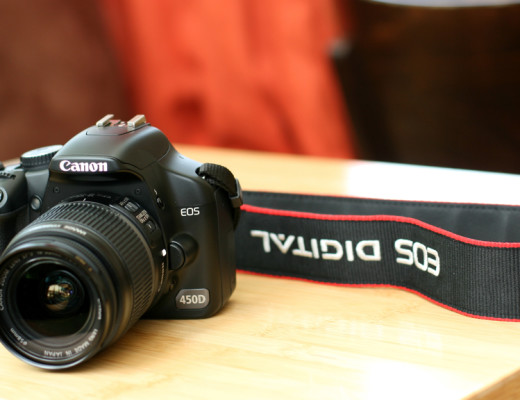
Canon XSi/450D (front)

A lot of people ask me how I take such fantastic pictures. I usually tell them I’m just really talented and obviously have an innate gift for “The Arts”. But because I don’t want to come off as vain, I put this emoticon “:p” at the end. :p

To be honest, I still consider myself quite new to photography and always feel humbled whenever I log into flickr and see the incredible photos people are taking. It seems that order to be a good photographer, you have to constantly learn things, some of them difficult, and be, like, creative all the time. Harsh, I know.

So here I am to help push you to be a better photographer with a super helpful photo tip every week until your photos are awesome, or I get bored of teaching you :p

Here Photo Tip #1: Learn How to Use Your Camera!

1. Read your camera manual!

read your camera manual

I know it’s boring. I didn’t want to read it either, but knowing how to move around your camera insides and outsides is really important. Nothing is more frustrating than fumbling around on your camera in the field. Where is that darn exposure button? How do I delete all pictures? Crud. How do I display the histogram? What are all these numbers and letters on the screen. Ack!

So get a good cuppa tea or coffee (if you prefer that vile stuff) and sit down with your camera and its manual. Go through all the menus and buttons with your camera. Don’t just read it passively, but actively go through every menu setting and button, camera in hand, taking test shots as you go.

I also recommend carrying it in your camera bag if you are a beginner. If you get stuck on something, look it up. Warning: This process may actually lead to learning how to use your camera as more than just an expensive and weighty electronic necklace.

This brings me to my next point…

2. Never use auto settings. Ever.

Auto Robot

I know this is a drastic statement, but trust me on this one, your photos will always look kinda crappy if you use auto settings. That includes the “face” one, the “running man” one, the “mountain” one, the “flower” one, even the “nighttime” or “fireworks” one! Any setting represented by a little cute picture is off limits!

I know that this is a difficult habit to break if you are new to photography. Like most people, I started taking photos on auto settings. After a while, I realized that I had no creative control and I noticed that basic things like focus, exposure, and white balance were all out of wack. Basically, my photos looked subpar and amateur. So I committed a lot of time and effort, and actually learnt stuff about aperture, shutter speed, etc. I know. Crazy.

So repeat after me, “I promise to not use my camera’s default auto setting as a crutch and take control of my photos!”

3. Always set your White Balance


super bad WB! correct WB-1

Nothing looks crappier than photos with incorrect white balance (WB). Your best friend will not appreciate looking like a member of the blue man group on her wedding day. Trust me.

The first thing i do before i take a picture is set the WB. I look around, take a few shots and figure out what the kind of colour temperature I’m dealing with ie. overhead tungsten lights, blinding fluorescents, daylight through a window, etc. and then set the white balance to best match what I see.

If you don’t know what to set the WB to when you are out in the field, then test it using that big screen on the back of your camera that lets you preview photos! Take a few snaps using different WB settings, and decide which best matches the colour of light you see. This may seem tricky, but dicerning between cloudy and sunny isn’t really that tough. And with some practice, you’ll quickly be able to identify trickier things tungsten bulbs and candlelight and mixed light… oh boy.

When you are dealing with a mixed light situation ie., florecent overhead lights, daylight coming in through a big window, use your judgement. What looks the best? Get into the habit of analyzing colour and light and experiment with different WB settings in camera. It’s a really easy thing to do, and will save you a lot of hassle colour correcting in post especially if you haven’t mastered Photoshop, Lightroom, Aperture, or “computers” in general.

To learn more, read this article.

That concludes my lecture for today. Give your camera some extra love this week and take a stack of awesome photos celebrating this last week of summer. If you live in Vancouver or England, remember to bring your umbrella!

Thoughts and comments?

Come say Hi on Flickr & stay tuned for next week’s awesome tip!