Posts Tagged ‘iPhone’

5 Ways to Take Great Street Photos with your iPhone

Jun 19 2010

The first step to taking great photos is getting outside and taking a lot photos. I know it’s scary to step away from your Apple control station and out into the cruel world, but I know you can do it. We can do it together.

1. Capture the Big Picture

When you arrive at a location try to take a picture that captures the entire scene. Take a step back and try to compose your shot so that you get all the action in one shot.

Empire State, FX: Hipster + Vintage border.

(more…)

Win My Dream 5DMKII Camera Rig!

Jun 8 2010

I’m just about to fall asleep for the first time in 41 hours. The launch of Camera+, the iPhone photo App I’ve been working on with Taptaptap, coupled with iPhone 4  buzz, the AT&T fail, and general WWDC pandemonium.

I just wanted to let everyone, especially budding photographers, about this ridiculous promotion we are doing for Camera+  to win my dream camera rig (valued at over $10,000).
(more…)

Camera+, The Ultimate iPhone Photo App

Jun 7 2010

Best iPhone Camera App Ever and my first App ; )

Camera+, the App that I’ve been working on for over a year, is now available in the App Store.

Woooo! *does a happy dance*

If you’ve been following my Twitter, Tumblr or Flickr stream, you’ve probably noticed a lot of iPhone shots pop up recently from my trips to New York and San Francisco. Now I can finally share the amazing app that created all those cool FXs!

(more…)

New York City through the lens of my iPhone

May 8 2010

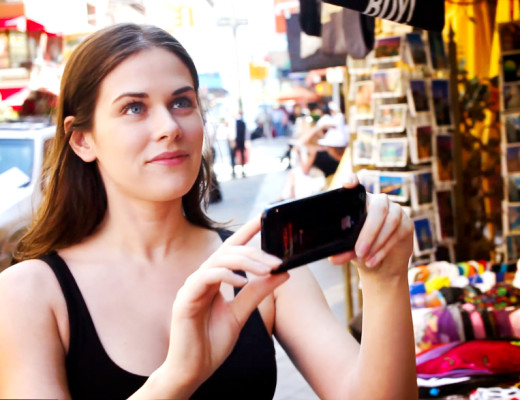
Lisa taking iPhone shots in Little Italy, NYC
Video still by Eric Fischer

NYC: A city that is dead serious about yellow taxis, car horns, smoking, noise, fashion, firemen & late night diner food.

As soon as I step out of the plane in Newark, NJ, I am in full sensory overload.

Arriving in Newark, NJ.

The stifling, muggy heat is a shock to my system. It reminds me of Toronto in mid-August during an unbearable heat wave.

Pete Cashmore being hit with the muggy air outside of Newark Airport.

The city is sticky. My flip flops slap against the side walk and actually stick for a fraction of a second, until they get a dunk in something wet. I’m hoping it’s left over rain water. *crosses fingers*


Sex & the City sign in Chinatown.

(more…)

Voices: A Fun Voice Morphing app for your iPhone

Nov 19 2009


Download Voices for your iPhone.

If you think this is weird, you should see the outtakes! Oh boy. I’ll post the behind the scenes video once I recover from this all-nighter. ZzZ.

I had a lot of fun making this video and playing with the Voices app. There is nothing funnier than sounding like a drunk robot or a possessed chipmunk. Especially at 3am after being up for 30 hours and engulfing massive amounts of helium.

Lisa Voices
The lights were so smoking hot they popped a few balloons including the one that surprised me in the video!

Lisa Voices2
Best $29 I ever spent. How can you not love a raccoon hat?

For more info & fun, go and checkout all the voices sound bites I made on the Taptaptap blog. The Voices app is only 99¢ and worth every penny.

PS. Chipmunk costumes are unbelievably hard to find. Hot business opportunity, any takers?

5 iPhone Photography Apps to make your Shots Spectacular

May 25 2009

iPhone shot of the day: Sublime Sunset
Sublime Sunset on Kits Beach captured with an iPhone.

So many people whine about the iPhone’s camera quality and say that it can’t take good pictures. It’s my strong belief that you can take great shots with any camera, even a 2 MP iPhone camera. It’s definitely a greater challenge to get a good exposure on an iPhone vs a 5D MkII, but it’s not impossible.

If you are up for the challenge, here are 5 apps that will help you take smashing iPhone pictures:

1. Blurry photos? Use Fast Tap Camera $.99

burned
Fast Tap Camera snapped my awesome new scooter trick. :P 

Shaky hands = shaky picture. Unless you are going for some motion blur, or light painting, then you probably want a sharp picture. The problem is the camera button is so fracking small and awkwardly placed, especially if you are taking a photo from any other angle other than straight in front of you. That’s why you need Fast Tap Camera. Press anywhere on the screen and snap! Excellent for narcissistic twitpics of yourself. :P

2. Photos are too dark? Use Photogene $2.99

iPhone photo of the day: Easter Eggz
Easter eggs in a supermarket never looked so good.

The exposure is locked on the iPhone, which means that you can’t change it. There is a way to mess with the exposure by focusing the camera on a dark spot and quickly shifting it into the light, and snapping the shot almost simultaneously. This technique requires serious ninja skills. If you aren’t quite at a black belt level with your iPhone camera like  Chase Jarvis, you may need a little post-production help.

Photogene allows you to adjust levels, exposure, colours, saturation, among other things (cropping, adding text, speech bubbles, etc.. I use this app more than any other. It’s well worth the $2.99.

3. Low light photos look crappy? Use NightCamera $.99

 iPhone Shot of the Day: Buena Vista Park, SF
NightCamera gives Buena Vista Park, SF  a little boost.

You shouldn’t really have high expectations for iPhone shots taken in a dark restaurant. They are always going to look noisy and fairly crappy, but using NightCamera makes them slightly less crappy. Yeah! My suggestion is that you try using NightCamera any situation where the light is low, like the forest in the above picture.

Either way, NightCamera has a neat accelerometer assisted camera mode where the shutter fires when the phone is steady, and a timer mode. You can also prop up your iPhone on a table top or against a wall to keep it steady. If you are really gung-ho, Joby makes a gorilla pod for mobile devices called the Go-Go. 

4. Photos need a little something extra?  Tiffin’s Photo fx $2.99

me and mum painter's
I used the Center Spot filter to fake the LensBaby effect around my mum and I.

Add an optical filter of pizzaz to your shots by applying one of the 26 filters in Tiffen’s Photo fx. This is one of my favourite apps for making photos pop. Add a colour gradient to make sunsets more punchy, a polarizer to make skies richer, vignette to make faces stand out. You can even layer a bunch of filers on top of each other for a super cool effect.

5. Photos all look the same? Use CameraBag $2.99

boat holga iphone
This boat house looks extra derelict with Camera Bag’s Helga preset.
 
CameraBag is the easiest photo apps to use, and one of the coolest. Choose your photo and scroll through the 8 presets. I like the Helga (faux Holga) & Lolo (faux Lomo) settings the best. I find that the Fisheye setting never really comes out and the Infrared setting is just plain weird, but experiment with your own shots. You never know what you’ll come up with.

Photos don’t have to be perfect to capture a memorable place, scene, or moment, but they do need to be taken. So shoot with whatever you’ve got and make it spectacular!

Do you have a favourite iPhone Photography app? Share it in the comments!

The iPhone: A Photographer’s 2nd Best Friend

Mar 1 2009

Here are ways you can use your iPhone as a multi-purposed tool to keep you prepared, organized, and inspired, before, during, and after photo shoots:

1. Build a reference library of cool locations

Ry-warehouse
A shoot I did with Ry at a cool warehouse location I scouted a few weeks before.

When you’re out and about, always be on the look out for cool places that would be great locations for photo shoots: An abandoned warehouse, a great patch of long grass, a gnarled old tree on a hill top, a stark modern apartment building etc. Snap a couple shots of the location from different angles and file it in an album for future reference.

After a while, you will start to build up an excellent reference library of locations that you can pull up to show a client or model or yourself. It will save you a lot of time scouting for locations and also help you generate ideas in the early planning stages of a shoot.

2. Shoot your gear & set-ups

gear I used for the Giant Ant Media shoot
Gear Redpilot used for a recent shoot for Giant Ant Media. First test with the Ray Flash.

Every time you shoot, take a picture of your gear and any lighting set-ups you used for a photo shoot. Like at a recent shoot I used a new piece of gear: The Ray Flash. I’ll always remember when and where I used this gear because I have a photo of it.

I also find it really helpful to keep track of lighting set-ups that work and ones that don’t, especially when you are using some DIY set-ups. Sometimes the $5 Ikea curtain works great, sometimes not so much. I usually review my stobe & DIY set-ups after a shoot to try to find ways of improving the setup to achieve better results.

3. Share your set-ups with other photographers

DIY set-up for jesse godin shoot
DIY Ikea curtain diffuser we used for a shoot with drummer Jesse Godin.

It’s also nice to share your set-up with other photographers, like Strobist does.

If you are a photo blogger or share your photos on flickr, consider writing a little blurb about your set-up or show a picture. You’ll learn a lot from doing this exercises and you’ll get to start a discourse with other photographers and gain from their knowledge.

I am trying to do more of that on flickr and on my blog. I’m even getting into the habit quickly posting shots of my set-ups while I’m on location to TwitPic and Twitter using the iPhone App, Tweetie.

4. Make an album of reference photos

ref photos for kylee
Album of reference shots I used for this shoot with musician Kylee Epp.

When you are planning for a shoot, gather a bunch of reference shots that inspire you. Look for shots with cool lighting, composition, model’s positioning, interesting location or just an intangible je ne sais quoi that gets your creative juices flowing! After you have gathered a good group of shots, make an album of these photos on your iPhone.

When you are on location, you can easily pull up these shots to show the model, client or help remind yourself what look you are going for.

This works with other types of photography, not just for fashion & portrait photography. If you are a landscape photographer trying to get that perfect shot of Oxbow Bend, then do an image search on flickr for “Oxbow Bend”. You will find a plethora of images. Having those images at your fingertips when you are on location will help you find the best angle or lighting situation. It may also inspire you to break out from the crowd and find your own unique shot.

5. Carry your portfolio in the palm of your hand with Klick

portfolio

You never know where you are going to run into your next client. They may end up sitting next to on a plane or you may bump into them on the street. Imagine if you had your photography portfolio in the palm of your hand? Here’s how you do it:

  • Get together 20 of your best shots,
  • make a set for these photos on Flickr,
  • download an awesome Flickr iPhone app called Klick

And voila! Instant access to your photography portfolio wherever you go. It’s also good to have your portfolio album in Camera roll as well for times when you don’t have access to wi-fi.

the iPhone Stack

Jun 16 2008

iPhone Stack

Introducing Silicon Valley’s favorite party game: the iPhone stack! I dare you to beat this stack of 13 iPhones!

PS. My ultra portable Canadian iPhone was rejected from the stack. It hurt. A lot. *sadness*
(more…)

iPhone in Canada, eh?

Apr 29 2008

The Very First Canadian iPhone

Is it true? Is Canada finally getting the iPhone?

Canadian wireless carrier Rogers Wireless said Tuesday it has reached an agreement with Apple to begin offering the iPhone later this year, putting an end to months of speculation on the subject.

Well. It’s. Aboot. Time!

Now, I can finally ditch my unlocked Fisher Price Skytalker Walkie Talkie which I’ve been using for the last 12 years as a method to communicate with my friends, family, lost polar bears, ice skating beavers, and the Mounted Police within a reception range of 1 – 25m… assuming they have the other Walkie on them… and they turn it on at exactly the same time as me… and the batteries don’t die in the subarctic temperatures.

It’s a crap shoot, I’ll admit. But, you know how Canadians love to be the underdog in a long and arduous, losing battle.

Another great screenshot I see. Sometimes you just can’t win. Zoink.

Want Mostly Lisa updates? Subscribe to my RSS feed.