
Sublime Sunset on Kits Beach captured with an iPhone.
So many people whine about the iPhone’s camera quality and say that it can’t take good pictures. It’s my strong belief that you can take great shots with any camera, even a 2 MP iPhone camera. It’s definitely a greater challenge to get a good exposure on an iPhone vs a 5D MkII, but it’s not impossible.
If you are up for the challenge, here are 5 apps that will help you take smashing iPhone pictures:
1. Blurry photos? Use Fast Tap Camera $.99
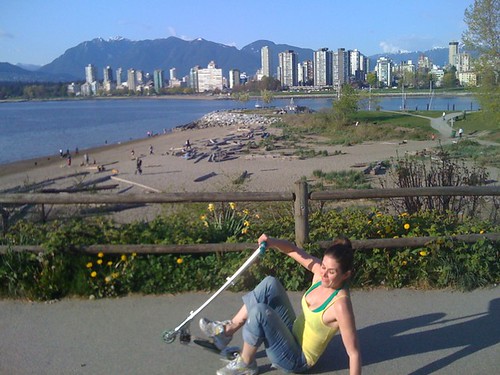
Fast Tap Camera snapped my awesome new scooter trick. :P
Shaky hands = shaky picture. Unless you are going for some motion blur, or light painting, then you probably want a sharp picture. The problem is the camera button is so fracking small and awkwardly placed, especially if you are taking a photo from any other angle other than straight in front of you. That’s why you need Fast Tap Camera. Press anywhere on the screen and snap! Excellent for narcissistic twitpics of yourself. :P
2. Photos are too dark? Use Photogene $2.99

Easter eggs in a supermarket never looked so good.
The exposure is locked on the iPhone, which means that you can’t change it. There is a way to mess with the exposure by focusing the camera on a dark spot and quickly shifting it into the light, and snapping the shot almost simultaneously. This technique requires serious ninja skills. If you aren’t quite at a black belt level with your iPhone camera like Chase Jarvis, you may need a little post-production help.
Photogene allows you to adjust levels, exposure, colours, saturation, among other things (cropping, adding text, speech bubbles, etc.. I use this app more than any other. It’s well worth the $2.99.
3. Low light photos look crappy? Use NightCamera $.99

NightCamera gives Buena Vista Park, SF a little boost.
You shouldn’t really have high expectations for iPhone shots taken in a dark restaurant. They are always going to look noisy and fairly crappy, but using NightCamera makes them slightly less crappy. Yeah! My suggestion is that you try using NightCamera any situation where the light is low, like the forest in the above picture.
Either way, NightCamera has a neat accelerometer assisted camera mode where the shutter fires when the phone is steady, and a timer mode. You can also prop up your iPhone on a table top or against a wall to keep it steady. If you are really gung-ho, Joby makes a gorilla pod for mobile devices called the Go-Go.
4. Photos need a little something extra? Tiffin’s Photo fx $2.99

I used the Center Spot filter to fake the LensBaby effect around my mum and I.
Add an optical filter of pizzaz to your shots by applying one of the 26 filters in Tiffen’s Photo fx. This is one of my favourite apps for making photos pop. Add a colour gradient to make sunsets more punchy, a polarizer to make skies richer, vignette to make faces stand out. You can even layer a bunch of filers on top of each other for a super cool effect.
5. Photos all look the same? Use CameraBag $2.99

This boat house looks extra derelict with Camera Bag’s Helga preset.
CameraBag is the easiest photo apps to use, and one of the coolest. Choose your photo and scroll through the 8 presets. I like the Helga (faux Holga) & Lolo (faux Lomo) settings the best. I find that the Fisheye setting never really comes out and the Infrared setting is just plain weird, but experiment with your own shots. You never know what you’ll come up with.
Photos don’t have to be perfect to capture a memorable place, scene, or moment, but they do need to be taken. So shoot with whatever you’ve got and make it spectacular!



Marc
May 25, 2009 at 4:41 AMI really hope the new iPod touch has a camera. I think it’s rumoured that one’s coming. I’d love an iPhone, but they’re only on O2 here (no signal where I live) and they cost SO much! And the storage sucks at the moment.
They should make an iPod touch with a HDD. I think people would be willing to sacrifice thinness for über storage (120GB). I know I would.
Andre
May 25, 2009 at 4:55 AMHi Lisa, you should try CameraKit, thats another iPhone app i can´t live without any more.
Frank
May 25, 2009 at 6:17 AMDid you add a lens to make the egg photo? It seems you mentioned using a case with a lens on it at one time. It doesn’t look like a simple computer filter. At any rate, the photos are all great, much better than what I can manage with my iPhone, particularly the colors and dynamic range.
Ronn
May 25, 2009 at 6:53 AMHave been having fun with Toy Camera. Adds the Forest Gump ‘Life is like a box of chocolates…’ effect to my iPhone photos.
chris
May 25, 2009 at 12:57 PMKlick for uploading to flickr. ProCamera because it combines the features of several photo apps I’ve purchased previously.
Johanna
May 26, 2009 at 8:42 AMI’m glad you’re back. Thanks for the tips.
One thing, I’m sure you know this and have just been busy, but for a blog to be successful… You need to have regular posts. At least once or twice a week. And the posts don’t need to be all that long, and long as you update your readers.
– Keep it up.
Michael Pate
May 26, 2009 at 1:01 PMI have been using iEasyCamera – which seems to do the same thing as FastTapCamera – and for the same price.
Aimee Greeblemonkey
May 26, 2009 at 2:30 PMI am a big fan of Shake It Photo. Mimicking Polaroid, with extra contrast, saturation and graininess!
http://www.flickr.com/photos/greeblemonkey/3530601728/
chriskalani
May 26, 2009 at 3:08 PMToy Camera and QuadCamera for me.
Josh H.
May 28, 2009 at 9:07 AMYou missed two major photo apps!
Pano – http://appshopper.com/photography/pano
TiltShift – http://appshopper.com/photography/tiltshift
If you’re going to pick to purchase between one or the other, get Pano first. It’s an amazing tool.
pierre
May 28, 2009 at 11:37 AMI like the portrait of your mom, and she’s got very expressive eyes.
I like poladroid quite a bit , seems to do a good job at replicating polaroid film (colros and texture) and it’s fun to use too.
Greg
May 30, 2009 at 9:25 PMDSLR Remote works as a Remote Control for a Canon EOS camera. The Pro Version includes Live View. (I’m waiting for the Nikon version – it’s being developed.) Pretty neat idea though.
Rey’s A Point » Links N’ Junk: Spring Is In The Air
June 1, 2009 at 4:51 PM[…] ilife. iphone apps to get better ifotos. […]
Avatar
June 6, 2009 at 9:51 PMThese are pretty cool apps for iPhone. I haven’t get an iPhone yet… I just had new Nokia phone, lol. iPhone was just launced in my country. :)
Luke
July 12, 2009 at 9:07 AMDon’t forget PhotoRoom!
TecnoBlog » Lo ultimo en tecnologia y novedades tecnologicas » Cómo hacer buenas fotos con el iPhone: Mostly Lisa
September 2, 2009 at 1:04 AM[…] del mismo no sea comparable a la calidad de una cámara normal. Y si no que se lo pregunten a Lisa Bettany, a la que probablemente conoceréis por los vídeos de MacHeist en su papel de espía […]
Mostly Lisa: Cómo hacer buenas tus fotos con el iPhone
September 2, 2009 at 3:12 PM[…] Fuera de su espacio en Flickr con multitudinarias fotografías de calidad, Lisa ofrece montones de entradas en su blog a la fotografía y, en el mismo, buenos consejos al momento de hacer fotos. Esta vez nos da algunos consejos acerca de cómo mejorar las fotografías con tu iPhone, entrando a esta página https://mostlylisa.com/blog/iphone-photography-apps/. […]
Lisa Mostly: come scattare buone foto con l’iPhone | LaMelamozzicata
September 3, 2009 at 2:35 AM[…] le foto con il nostro gadget preferito. Per esempio, in questa entrata ci svela qualche segreto per migliorare le nostre foto con l’iPhone […]
Mostly Lisa: Cómo hacer buenas tus fotos con el iPhone | Moova! News on the Move
September 3, 2009 at 10:46 AM[…] da algunos consejos acerca de cómo mejorar las fotografías con tu iPhone, entrando a esta página https://mostlylisa.com/blog/iphone-photography-apps/. Lisa es además miembro de un grupo de Flickr que se dedica a la fotografía con el iPhone, en […]
Rohit
September 22, 2009 at 8:29 AM“The Best Camera” app for the iPhone by Chase Jarvis. It’s brilliant! http://retwt.me/bonr
Vivek
September 29, 2009 at 6:14 PMI attended a lecture on HDR last weekend and came to know of this free app called EVCalc. It acts as a cheat book and helps “calculate” exposure bracketing. More info on this link – http://findfiles.com/318174367/iphone-app-evcalc.html?&setsite=win
Kareem Whitcher
December 22, 2009 at 2:55 PMExtraordinary post you have realized here! The web is awash of bad authorship and I was taken hold of by your lucidity. Your decisions are dead-on and I will forthwith subscribe to your rss feed to stay up to date with your up approaching postings. Yes! I accept it, your publishing style is magical and I will work more concentrated on mine.
Jesús Durán
April 23, 2010 at 11:02 AMHi!
Great site!
Do you know Hipstamatic for iPhone?
http://hipstamaticapp.com/
;-)
estetik
April 7, 2011 at 7:19 AMI have been using iEasyCamera – which seems to do the same thing as FastTapCamera – and for the same price.
652
camaca
April 19, 2011 at 11:03 AMI love to use Hipstamatic and Instagram.
More Lomo is a free and fast application that rocks
Bumblejax Photo Mounting
October 1, 2011 at 12:21 PMI was just reading an article over at techcrunch saying that 10% of all photos ever taken have been taken in the past year and that a photography explosion is taking place thanks to the iphone and apps like camera +, instagram and hipstamatic. Exciting times.