Best iPhone Camera App Ever and my first App ; )
Camera+, the App that I’ve been working on for over a year, is now available in the App Store.
Woooo! *does a happy dance*
If you’ve been following my Twitter, Tumblr or Flickr stream, you’ve probably noticed a lot of iPhone shots pop up recently from my trips to New York and San Francisco. Now I can finally share the amazing app that created all those cool FXs!

HDR (Special FX)
I partnered with the amazing Taptaptap team including, John Casasanta, Scott Meinzer, Wolfgang Bartleme and Karl Von Randow, on Camera+ and I truly believe we built the most streamlined and extensive camera App for the iPhone.

Purple Haze (Colour FX)
I spent most of my time creating and tweaking all the custom Scene and FXs for the App in Photoshop. In all honesty, it was really hard coming up with 24 unique FXs.
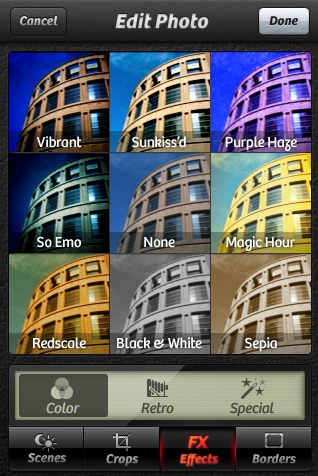
I can’t even count the number of crazy and horrible FXs I came up with in the process, but I’m sure my colleagues can tell you that “subtlety” is not in my post-processing vocabulary. :P

Hipster (Retro FX).
We went all out on the names of the FXs, “So Emo” being my absolute favourite.
We’ve all had so much fun testing and creating the App, minus the time when we got slapped with a big rejection from Apple for trying to sneak in an illegal feature :-/
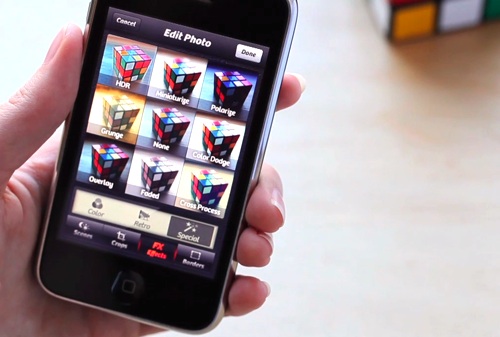
It’s been a long process and one that has renewed my passion for taking and sharing images. I am ecstatic to share this App with you! I can’t wait to see what you create with Camera+.
Download the App & show me your photos!




Eaglefan
May 24, 2011 at 5:24 PMI am having issues with the app. About a month ago, it stopped taking pictures and would cause my I phone 3 to got back to home screen when I tapped to take picture or tapped to look at pictures in lightbox. I am unsure if app related or phone related because the original camera app on the phone is doing the same thing. Any insight or guidance in correcting the issue would be appreciated.
Thank You
دوربین مدار بسته
May 27, 2011 at 6:30 AMThanks Lisa !
دوربین مدار بسته
JJ
May 27, 2011 at 12:11 PMAnother wish for the android version! :-)
Biddster
May 28, 2011 at 4:18 PMAndroid please, this app is the only thing I miss since the switch from Apple.
André Torkveen
June 5, 2011 at 4:05 AMLisa,
For sure, you’ve made nothing short of a great mobile app here! But *IS* it a mobile app or is it really an Apple app? Hear, hear the “noise” about Android – that could mean a revenue stream to you! I for one see Camera+ as the sole reason for going for an iPhone, but even though I’m something of a Mac-head I will *NOT* follow the iPhone way. If that’s the only way to camera+, I’ll continue to be without it.
James
June 8, 2011 at 11:56 AMPlease pleeease port it to Android!!
Ian
June 9, 2011 at 3:48 PMI once had an iphone and this app and loved it. I’ve long since switched and am happier with my phone than ever, save this loss. I’d be surprised to see it come to android however. Android suffers from the same thing that plagues PC’s – Hardware Options. I’m not positive this is the hold-up, but considering there are probably dozens of different types of cameras among android phones vs. the handful in iphones I could see where an app such is this would be much harder to develop without a very controlled hardware set.
I could also be pretty far off, just speculation :) Still hoping to get it on my beloved android!!
Mary
June 11, 2011 at 10:09 PMThis is the best application ever and the only reason I regret buying an Android instead of an iphone, will this app ever be available for the Android market?
Chase
July 8, 2011 at 7:21 AMLisa, can you please advise if this app willever be available for the Android?
Peter Petrovski
July 10, 2011 at 7:50 AMPlease Please Please make an Android app!
I switched from iPhone to Android and I really miss this app. I’m sure it will be mega successful if it was released on the marketplace!
The solution to the problems in the photography industry | Chris Johnston Photography
July 20, 2011 at 8:46 PM[…] create a digital product. Think Lisa Bettany and the Camera+ iPhone app, David duChemin and all his books at CraftandVision.com, JoeyL and his Photoshop training […]
The solution to the problems in the photography industry | Chris Johnston Photography
July 20, 2011 at 8:46 PM[…] create a digital product. Think Lisa Bettany and the Camera+ iPhone app, David duChemin and all his books at CraftandVision.com, JoeyL and his Photoshop training […]
Richard Daugherty
July 21, 2011 at 5:54 PMI, too, vote for an Android version. Remember the recent statistics Leo Laporte keeps mentioning: over 500,000 Android devices are being activated DAILY.
Alex
July 24, 2011 at 10:52 AMHi there – can anyone recommend a product to use on a mac computer with the same features as camera+? It seems counterintuitive to have to load all the pictures onto my phone to edit them
Gifer
August 18, 2011 at 2:43 AMplease make one for android user :)
Bertold
August 19, 2011 at 7:07 AMYou are so hot it makes me want to cry.
I bought the app just for that reason.
Erin
August 19, 2011 at 8:57 AMDownloaded the app but it won’t open :( I tried deleting and re-downloading it, as well as a hard reset but it still won;t work. Any suggestions? I have a 3. Thanks!
andree
August 28, 2011 at 8:06 AMNo comment on filter stacking?
I love this app but feel that lack of stacking is a glaring oversight. Certainly, it isn’t a” feature” of simplicity??!
Still no. 1 app though.
Jake
September 7, 2011 at 5:36 PMHey. Do you have any plans to do this app for android?
Trisha
September 10, 2011 at 3:56 AMPLEEEEEASE MAKE IT AN ANDROID APP ALSO :)))) just LOOOVED Camera+ on the iPhone 4 :))) wish i could get it on my samsung galaxy (android)
Trisha
September 10, 2011 at 3:56 AMPLEEEEEASE MAKE IT AN ANDROID APP ALSO :)))) just LOOOVED Camera+ on the iPhone 4 :))) wish i could get it on my samsung galaxy (android)
:)
Dario
October 10, 2011 at 2:23 AMHey there.. I’ve been using this app since i got my iPhone in december, and I took so many good photos with my girlfriend. I’m going to switch to an android device, because I’m so bored by iOS, the only thing I will miss is this app, because there’s no comparable one in the android market. Will there soon be a release of camera+ for android? I hope that so much… :(
Naveen Konduri
October 10, 2011 at 1:57 PMCamera+ is an app full of awesomeness, I pretty much take and edit all the pictures which I post on to my photo blog, http://www.shotwithmyphone.com .
I am an Iphoneographer and love the way I can bring my pictures to life using all the wonder filled wonderful effects. Keep up the great work and I cant wait to see what I can do with Camera+ on the super juicy cam iPhone 4S would sport.
Damien
October 11, 2011 at 6:36 AMOne of my top 20 iOS apps. You could for sure get even richer when publishing this for android !
Rao
October 23, 2011 at 8:32 PM+1 for iCloud integration
Dave
October 28, 2011 at 2:35 AMWill you be adding the “shoot using volume button” feature again now that Apple has used it itself?
Andie
November 15, 2011 at 7:40 AMLisa, please give us a clue as to when an android version of this app is coming. because I miss this from my previous iPhone (now that I’m android user). It’s the best camera app i have used. Please Port it!. PLEASE!
Thaddeus
December 7, 2011 at 9:08 PMAndroid please!
Lisa Bettany | Postdesk Christmas 2011
December 17, 2011 at 3:41 PM[…] a columnist and video producer for The Vancouver Province, and co-creator of iPhone Application Camera+. Her website and blog is over at mostlylisa.com and on Twitter she is known […]
How to Handle Christmas Shopping Panic |
December 21, 2011 at 5:42 PM[…] them and enclose a check for the total cost of the apps. Photography buffs should include a copy of Camera+ from photographer Lisa Bettany. It’s one of the coolest things I’ve seen this year, with all you need to be a great […]
Bill
December 23, 2011 at 7:18 AMHow well does this app work on iPad?
Tyrren Yates
December 23, 2011 at 7:47 AMHow about a version for the silent minority – Windows Phone 7.5? I would actually pay more for this great looking app…if it worked with my Mango phone!
Frankie
February 5, 2012 at 5:04 AMAndroid version PLEEEEEEEAAASE!!!!! YOU WOULD SELL MILLIONS!
Neifen
February 27, 2012 at 4:29 AMAndroid please… :(
The solution to the problems in the photography industry
March 20, 2012 at 6:39 AM[…] create a digital product. Think Lisa Bettany and the Camera+ iPhone app, David duChemin and all his books at CraftandVision.com, JoeyL and his Photoshop training […]
Ad
April 19, 2012 at 4:43 AMANDROID ANDROID ANDROID ANDROID ANDROID ANDROID ANDROID ANDROID ANDROID ANDROID ANDROID ANDROID ANDROID ANDROID PLEASEEEEEEEE :))
wes
June 6, 2012 at 10:06 AMAndroid please!!!!!!!!!!!!!!!!!!
ClickPic
June 26, 2012 at 10:17 PMNow to make a non-Phone/iPad version!
Love this app, use it alot with rave reviews, even professional photographers envy the results (not to mention the ease!)
If only there was software as easy as this for PC/MAC use but not on an iPhone/iPad (screen size limiting)
Truly awesome!
GW
August 8, 2012 at 8:37 AMANDROID Please ANDROID Please ANDROID Please ANDROID Please ANDROID Please ANDROID Please ANDROID Please ANDROID Please ANDROID Please ANDROID Please ANDROID Please ANDROID Please ANDROID Please ANDROID Please ANDROID Please ANDROID Please ANDROID Please ANDROID Please ANDROID Please ANDROID Please ANDROID Please ANDROID Please ANDROID Please ANDROID Please
Moosa
October 27, 2012 at 10:16 AMApp is great, but hate the fact that still there us no reply
From developer about the Android release queries / requests,,
It would be surely great to have an answer !
Lana
June 16, 2013 at 6:36 PMOne of my favorite camera apps for sure! Love the HDR effect!