Posts Tagged ‘Featured’

Behind the Scenes: Promo shoot with Kylee Epp

Sep 7 2008

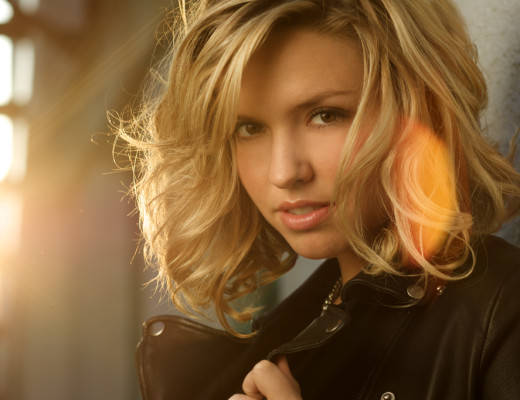
Kylee Epp Promo Shot
Photo by Redpilot Media: Ryland Haggis and Lisa Bettany

We were chasing magic hour trying to capture soft, sultry backlit promo shots for musician, Kylee Epp. We sat there waiting for the sun to peek through a metal staircase just behind Kylee’s head, illuminating her hair and giving the photo a kiss of lens flare.

When the sun hit it’s mark, we had about 5 minutes to capture the perfect shot. Man, is magic hour a stressful time for photographers. I wait everyday for it, because honestly the light quality you get during magic hour (the hour before sunset) is unprecedented. Golden and warm and soft and yum! But, you have to be quick because magic hour melts fasta’ than budda on popcorn.

Some technical details of the shoot for all you Strobist photogeeks: We were shooting with the Canon Xti and the 85mm f/1.8 & the 50mm f/1.4 In order to create soft, warm light on her face we used Pocket Wizards (wireless radio transmitters) to trigger the 430EX with a 1/4 CTO gel at 1/4 power through a large shoot-through umbrella about 2ft (60cm) from her face.

kylee's shoot umbrella

If you listen to TWiP, you’ve probably heard Scott Bourne say this a few times: “The bigger the light source is and the closer to the subject the light is the softer the light will be.” He’s totally on it, so remember this rule. It’s golden.

Once we lost the light in the first location we booked it to Jericho Beach to catch some sexy sunset shots.

Kylee Promo shot Jericho Beach

Ryland (the guy in charge of Redpilot Media) and I switched off taking shots and directing the shoot. It was cool to see the shots that resulted from two photographer’s combined creativity.

Ry taking shots of Kylee

Plus, somebody needed to be in charge of the umbrella and flash as it was super windy. Earlier in the shoot, we totally bent this umbrella, when a gust of wind sent it crashing down on Kylee’s head. I told her that she was now one step closer to becoming a model. After all, you can’t really call yourself a model until you’ve had at least one piece of equipment fall on you or, like, fainted during a shoot cuz you haven’t eaten in like, a week.

Note to self: Invest in some sandbags or weights to keep light stands from on models. Keep granola bars in bag to feed starving models before they faint.

As we were losing light we roped in one of Kylee’s friends to hold a third 430EX with 1/4 CTO flash for a warm edge light. As you can tell, she was lovin’ every minute of it. I think she’s has future camera assistant written all over her face. o_0

Future camera assistant in the making

Thanks for all your great Summertime shots! I’m really enjoying all your awesome entries for my first photo comp. If you haven’t already submitted something, join the Mostly Photos Comp group on Flickr and show us your best summer shot. I also encourage you to go look at other people’s shots and comment and discuss and inspire each other!

Learn How to Use Ur Camera

Aug 27 2008

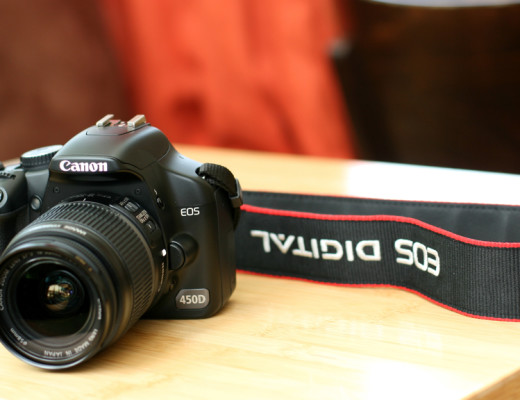
Canon XSi/450D (front)

A lot of people ask me how I take such fantastic pictures. I usually tell them I’m just really talented and obviously have an innate gift for “The Arts”. But because I don’t want to come off as vain, I put this emoticon “:p” at the end. :p

To be honest, I still consider myself quite new to photography and always feel humbled whenever I log into flickr and see the incredible photos people are taking. It seems that order to be a good photographer, you have to constantly learn things, some of them difficult, and be, like, creative all the time. Harsh, I know.

So here I am to help push you to be a better photographer with a super helpful photo tip every week until your photos are awesome, or I get bored of teaching you :p

Here Photo Tip #1: Learn How to Use Your Camera!

1. Read your camera manual!

read your camera manual

I know it’s boring. I didn’t want to read it either, but knowing how to move around your camera insides and outsides is really important. Nothing is more frustrating than fumbling around on your camera in the field. Where is that darn exposure button? How do I delete all pictures? Crud. How do I display the histogram? What are all these numbers and letters on the screen. Ack!

So get a good cuppa tea or coffee (if you prefer that vile stuff) and sit down with your camera and its manual. Go through all the menus and buttons with your camera. Don’t just read it passively, but actively go through every menu setting and button, camera in hand, taking test shots as you go.

I also recommend carrying it in your camera bag if you are a beginner. If you get stuck on something, look it up. Warning: This process may actually lead to learning how to use your camera as more than just an expensive and weighty electronic necklace.

This brings me to my next point…

2. Never use auto settings. Ever.

Auto Robot

I know this is a drastic statement, but trust me on this one, your photos will always look kinda crappy if you use auto settings. That includes the “face” one, the “running man” one, the “mountain” one, the “flower” one, even the “nighttime” or “fireworks” one! Any setting represented by a little cute picture is off limits!

I know that this is a difficult habit to break if you are new to photography. Like most people, I started taking photos on auto settings. After a while, I realized that I had no creative control and I noticed that basic things like focus, exposure, and white balance were all out of wack. Basically, my photos looked subpar and amateur. So I committed a lot of time and effort, and actually learnt stuff about aperture, shutter speed, etc. I know. Crazy.

So repeat after me, “I promise to not use my camera’s default auto setting as a crutch and take control of my photos!”

3. Always set your White Balance


super bad WB! correct WB-1

Nothing looks crappier than photos with incorrect white balance (WB). Your best friend will not appreciate looking like a member of the blue man group on her wedding day. Trust me.

The first thing i do before i take a picture is set the WB. I look around, take a few shots and figure out what the kind of colour temperature I’m dealing with ie. overhead tungsten lights, blinding fluorescents, daylight through a window, etc. and then set the white balance to best match what I see.

If you don’t know what to set the WB to when you are out in the field, then test it using that big screen on the back of your camera that lets you preview photos! Take a few snaps using different WB settings, and decide which best matches the colour of light you see. This may seem tricky, but dicerning between cloudy and sunny isn’t really that tough. And with some practice, you’ll quickly be able to identify trickier things tungsten bulbs and candlelight and mixed light… oh boy.

When you are dealing with a mixed light situation ie., florecent overhead lights, daylight coming in through a big window, use your judgement. What looks the best? Get into the habit of analyzing colour and light and experiment with different WB settings in camera. It’s a really easy thing to do, and will save you a lot of hassle colour correcting in post especially if you haven’t mastered Photoshop, Lightroom, Aperture, or “computers” in general.

To learn more, read this article.

That concludes my lecture for today. Give your camera some extra love this week and take a stack of awesome photos celebrating this last week of summer. If you live in Vancouver or England, remember to bring your umbrella!

Thoughts and comments?

Come say Hi on Flickr & stay tuned for next week’s awesome tip!

What are Your Rights as a Videographer or Photographer?

Jun 17 2008

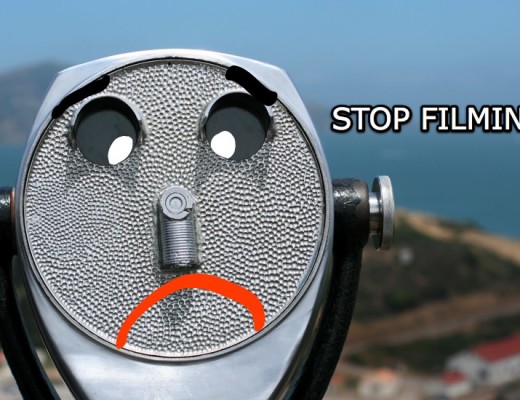
Stop filming me!

I have never really considered what my rights are as a video blogger, as I have only filmed myself and used all Redpilot music (or GBs) and photos in my videos. But yesterday, I posted a video that I took at private party whilst I was in San Francisco and a bunch of people were unhappy.

The party hosts were angry that I didn’t ask permission before posting the video, as it was their home and they were visible in the video. What made matters worse is that the video went viral on Valleywag (basically Silicon Valley’s US Weekly).

I honestly didn’t think of any of these issues before posting the video. I was more concerned with Feist suing me for using her song. I was genuinely surprised that anyone at this high-tech, twitter/blog centric gathering would mind me posting this video, let alone think it was a violation of privacy. But it was private property and I did not ask explicit permission before posting the video which was my fault entirely.
(more…)

DIY Photography for the Thrifty and Unrich

Apr 2 2008

As I’ve mentioned before, I love Strobist super DIY photo guru, David Hobby. His blog, Strobist.com is a daily inspiration for me. When I got my first digital SLR, about a year and a half ago, I spent most of my time sculking about in the alleyways of my city, photographing “hidden treasures” that I’d find. This “derelict” phase stopped abruptly in July 2007, about 10 days into the 88 day Vancouver city garbage strike.

I then moved my attention to things that smelt nicer like cupcakes, Pez, & trees. And after a few months of photographing happy shiny things, I worked up enough courage to photograph real live people who were not always happy or shiny. My main lighting techniques were:

  • Natural light is your best friend;
  • A big window on a sunny or partially cloudy day is your second best friend;
  • Low light? Open the aperture as wide as that sucker will go. f1.4 is money;
  • Cheap whiteboard makes a really nice bounce.

During this time, I experimented with using my behemoth of a flash, the 580ex. But, it was so heavy, I always regretted bringing it out to live performances, and frankly it scared people, and now I have no friends. That’s an exaggeration. I have a few friends, it’s just they seldom talk to me.

In the last six months, I’ve started to the long journey to master off-camera flash setups in order to exploring light more and create cool fashion, modeling, and artsy shoots. The trouble is that I need to make these setups for cheap as I only found $1.45 in the crooks and crannies of my sofa.

Using Strobist’s awesome DIY projects as inspiration, I am starting a new series on Mostly Lisa entitled: DIY Photography tips for the Thrifty and Unrich.


Mostly Lisa for Strobist-2

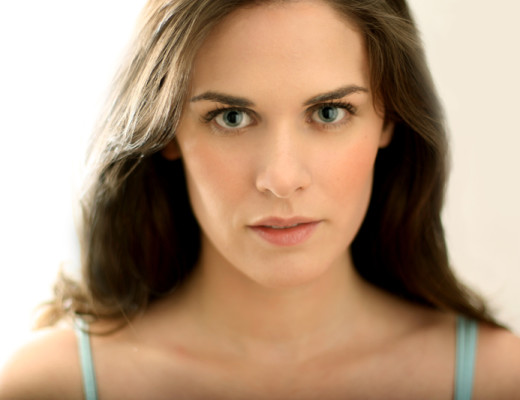
For the first shoot I wanted to do something a bit moodier than a typical modeling/acting headshot using an off-camera flash, some hard reflective surfaces (both portable and non) and a wee bit of creativity and smarts.

How we did it:
For these two shots, we had two Canon speedlights (430ex and 580ex) with Stofen Omnibounces at the same height as the subject, pointed straight up to give a “bare bulb” effect that would simultaneously blow out the background (a white wall in my living room) and light up the two 2′x3′ pieces of whiteboard in front of the photographer’s face (just out of frame) as fill.

The flashes were triggered with two cheap and untrustworthy Gadget Infinity remotes and were at 1/8 power, with the 580ex maybe less two thirds of a stop because it’s a more powerful unit. We started shooting at f1.4, but the focus was a bit soft in the above photo, so we bumped it up to f2.8 and added the second flash to create edge highlights (as you can tell by the highlights on both sides of my hair).


Mostly Lisa for Strobist-1

The Set-up:
One whiteboard was clamped to another lightstand with a couple $4 Home Depot clamps duct taped together to make a two-way clamp and the other (actually two boards taped together) was standing up on a nearby shelf (like a Christmas card). The camera was handheld just behind and in the middle of the two bounces.

Diagram of DIY Shoot #1

Redpilot's Strobist Inspired Set-up


Some Levels and Color Balance adjustments were made in Photoshop to enrich the blacks, push the highlights up some more, and warm up the whole image a little bit. No retouching was done on the computer-induced-big-black-bags-under-my-eyes. Not one bit.

If you have any cool off camera flashy photos that you’ve experimented with, link them in the comments!

Or if this is all waaaaay too technical for you you can just answer one question:
What camera do you use?
I’m actually really interested what camera everyone has – even if it’s not a fancy smancy one. So, talk camera nerdy to me!