Posts Tagged ‘Design’

Vectorama Challenge Part 4: Twitter love!

Jul 22 2008

Lisa's twitter bird
Rocking Twitter Bird Illustration by Pasquale D’Silva

Vectorama is a regular design/illustration competition on MostlyLisa.com. Last time, the Steelie’s Canadian Beaver took the top prize.

This month’s theme is Twitter Love!

Recently we’ve seen a lot of talk of new twitter mutinies in favor of more stable or enhanced mo-blogging platforms like Friend Feed. Though I use other platforms, nothing beats Twitter for me. In honor of the FailWhale, I’d love all the vector savvy design peeps out there to vector up a sweet Twitter bird. Maybe we can turn some fail in to Win…Whale. Wait, that didn’t make sense.

Oh and answer this question: With the new twitter clones popping up, are you going to stay with twitter or change to something new?

For the rules, read on:

(more…)

Vectorama III Champion

Jun 18 2008

All hail the new Vectorama: Canadian Edition champion! Steelie’s Beaver!

Canadian Vectorama by Steelie
By Steelie
(more…)

Vectorama III! Vote for your favourite now!

Jun 7 2008

Thanks to everyone who sent me their sweet Canadian vectorama! May the best beaver win!

Canadian Vectorama by Steelie
By Steelie

Vectorama by Mitch Bartlett
By Mitchell Bartlett

Canadian Vectorama by Jon Lane
By Jon Lane

Canadian Vectorama by RebeccaGillisDesign
By Rebecca Gillis

Canadian Vectorama by August
By August Ekman Öhrn

Canadian Vectorama by Peter Nguyen
By Peter Nguyen

Vote for your favourite vectorama in the comments below. You can only choose one! Chomp!

Vectorama Challenge Part 3: Canadian Things!

May 16 2008

Mostly Lisa's Vector Challenge: Canadian Things

Vectorama is a monthly design/illustration competition on MostlyLisa.com. Last month, the penguin themed illustration competition was so chill, it was ace! Ninja vs Penguin pwnd the other competitors with her uber stealth penguins.

This month’s theme is Canadian Things! Things like: Hockey, maple syrup, Mounties, mountains, moose, beavers, snow plows, ice, and famous Canadian people, like Avril Lavigne. Feel free to exploit any Canadian stereotype you like. I welcome your ridicule.

(more…)

And the Penguin Vectorama Glory Goes To….

Apr 20 2008


Congratulations to our new Champ: Emily Wong of Ninja vs Penguin. Her ninja penguin was certainly a hit. How can you not love a ninja penguin? Impossible I think.

I loved all the entries with all my heart and I’ll give all the designers some link love (right after this stawberry daiquiri) and can’t wait til next month to see what everyone will create. (and I will extend next month’s competition for a few weeks so busy designer peeps can have some time to create uber vectors.

Thanks to everyone that voted. There was some serious smack talking going on… It was a little scary at times, but I guess the pursuit of vector glory brings out all kinds of craziness.

PS. Saw the Mayan Ruins of Chichen Itza yesterday. Was seriously cool. I’ll post some picts later. Right now I’m heading to the beach to do some snorkeling and frolicking in the crystal clear waters. Don’t feel jealous, I’m taking loads of photos and videos so you can all feel like you were here…. but you weren’t so I guess it will still suck for you. I could photoshop you in?

Compete for Vector-Sized Glory!

Mar 7 2008

Vectorama Vectorama!!

I’ve already received some uber design entries for the First Annual Mostly Lisa Illustrator Vectorama Contest. In fact, I’ve almost snorted milk out of my nose because of one of the entries.

But I have to admit, nothing really holds a candle to my 5 legged spider. Oh he’s cunning that one. Well, he really has to be, with only 5 legs to scuttle aboot.

So get you’re act together! Open Illustrator and get your Adobe-on. You have until Sunday, March 9th at midnight (-8 GMT) to get your entries to me:
mostlylisa *at* gmail *dot* com.

Mostly Lisa’s Illustrator Vectorama Entry Rules:

  1. You must use Illustrator (obviously)
  2. Your design must not scare small children or warp the minds of impressionable youth
  3. You must include some kind of text that encapsulates the meaning of your illustration

The Vector-sized glory and a spot on my advertising gold mine of a sidebar could be yours. It’s only a few clicks away.

The First Annual Mostly Lisa Illustrator Vectorama

Mar 3 2008

Last week RBeezy challenged me to an Illustrator-Off. Being an ultra competitive person and an “expert” at all things Adobe, I am taking up this challenge with a fiery passion that feels like a cross between heartburn and sea sickness. No one said that creativity felt good.

And without further ceremony, I present my entry into the challenge:

Mostly Lisa's Illustrator-Off Entry

I know. It’s powerful. You definitely got your work cut out for you.

If you think you can produce an Illustrator design of great technical merit and expression email a 500×500 (max) JPG it to me: mostlylisa *at* gmail *dot* com. Take that Spam P1r@+z!

I will post your entries on my blog (no matter how feeble I they are) and let my fans vote for the winner of the First Annual Mostly Lisa Illustrator Vectorama. The winner will receive a coveted spot on my sidebar linking their winning design to their website. That advertising will be golden my friend, golden. And if I win, I’ll just put another picture of myself. People seem to like it. Why stop now?

Mostly Lisa’s Illustrator Vectorama Entry Rules:

  1. You must use Illustrator (obviously)
  2. Your design must not scare small children or warp the minds of impressionable youth
  3. You must include some kind of text that encapsulates the meaning of your illustration

Entry deadline is at midnight on Sunday March 9th. Let the challenge begin!

Illustrator 101 Tutorial: Make Your Own Cartoons

Feb 28 2008

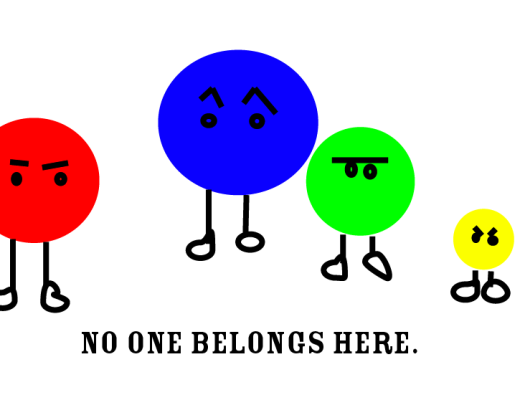
No one Belongs Here. Illustrator Cartoon..png

Step 1: Choose a shape.

I like circles. Do you? You probably do cuz most people do. So this is a good tool to start with. It’s kind of tricky to find the circle tool, cuz it’s hiding under the picture of a rectangle, but don’t let that fool you. It is actually there.

Step 2: Pick lively colours for your circles.

There are a lot of colours. Choosing them is hard. So it might take you some time to think of which ones are best for your circles. I was too busy to think so I just chose the first 4 colours in my palette.

Step 3: Make a bunch of circles.

Some big, some medium, some smaller. I liked putting the smallest one on the end, so he felt the most left out.

Step 4: Give your circles personality.

Right now your cartoon characters look like blobby circles. And circles don’t intrinsically have personality, so you have to give them eyes and eyebrows. Do you see how I made the green one look dubious with his monobrow and googly eyes? And the yellow one is obviously fuming mad. It’s cuz he’s being left out, as always. It’s touches like I’m mentioning that really help bring a character to life.

Step 5: Humanize your cartoon circles.

Another trick to make circles appear more like cartoon characters is to give them human features like legs and feet. I used the line tool to make their stick-like legs and then the Direct Selection Tool aka the small arrow tool that bends shapes, to make their misshapen feet. If you don’t know how to use this fancy tool, just click on things until you see some lines and dots and then pull the lines away from the dots. Random movement often creates the best results.

Step 6: Chose a meaningful, yet ambiguous slogan that makes you LOL.

People like meaning to be confusing. And you like them to be confused because at some point in their confusion they will think that you are you are smart and maybe even mysterious.

There you have it, 6 zippety quick steps to create your own mighty fine illustrator cartoon that you can use to impress your mum, grandmother, dog and even your most design savvy facebook friends!!!

Comments upgrade

Feb 20 2008

I just upgraded the comments section to reflect the uberness of you and your fabu comments. Just because I love you that much. What do you think about the new design? Likey? No likey?

CSS link love

Feb 13 2008

Since being featured on Best Web Gallery last week, I’ve received a whole lotta best CSS gallery l0v3. In appreciation of awarding my blog a spot in their best design galleries, I just wanted to send some link love in their direction.


CSSMania

CSSArtillery screenshot

CSS2

Screenfluent screenshot

Most Inspired

Css Drive

The Daily Slurp

LoopPress

Ala Brasil