Posts Tagged ‘camera’

Using VolumeSnap and your headphones as a remote control for Camera+

Dec 18 2011

VolumeSnap on Camera+ makes shooting a breeze.

One of the challenges with taking great iPhone photos is trying to take clear photos with minimal camera shake. Using the on-screen shutter button was challenging and extremely frustrating, especially in low light or whilst eating chicken wings. To solve this problem, especially the “greasy fingers on screen issue”, Camera+ added the ability to take a photo using the volume controls on your iPhone. After a few initial “hiccups”, we are thrilled to have VolumeSnap back in Camera+!

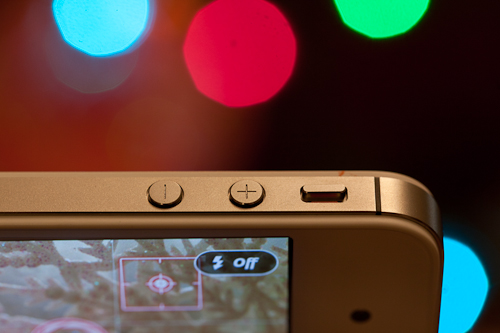
VolumeSnap allows you to hold your iPhone like a real camera steady your shots with both hands and quickly snap shots avoiding camera shake. The great part about VolumeSnap is that it also works with the volume up control on your headphones. Just plug in your headphones and snap photos with the volume up “+” button.

Use your headphones volume controls as a cable release.

While we’ve seen some huge improvements on the low light capability of the iPhone 4S, sometimes it’s necessary to use a tripod to avoid getting blurry photos when there isn’t enough ambient light like in a dimly lit room, outside at night, or shooting macros. For these shots, you can use your headphones as a cable shutter release to snap the photo without touching your iPhone creating camera shake.

Use VolumeSnap on your headphones to avoid camera shake with macros.

Ahh, the iPhone self-taken shot. I think we all tired of our seeing giant out-of-focus arms in self-taken iPhone shots of us and our bf/gf/bff/frenemy. Just pop in your headphone and trigger the shot from a distance that’s flattering your your arm as well as your face. Remember you can also tap to get a better exposure if your shot is blowing out.

Snapping photos with your headphones is an excellent way to get incredibly candid street shots or in places where some mean security will yell at you for taking photos which happens to me almost every day. No need for full ninja gear anymore, you can listen to music while surreptitiously snapping shots with your headphones. Works like a charm!

Do you have any useful tips for using VolumeSnap to get great shots? Let us know in the comments below!

Check out Camera+ if you don’t already have it!

Photoshop Tutorial: Nostalgia FX from Camera+

Sep 25 2011

Many people have asked me for a Photoshop breakdown on Camera+ FXs, so I thought I’d share the secrets behind one of my favourite FXs from the new I ♥ Analog pack, Nostalgia!

My original idea for Nostalgia was actually based on an old photograph of my mum taken in the early 70s. I loved the slight cross-processed look and the slightly yellowy aged look.

You can use the first few steps, minus the texture layers, to create a really easy vintage cross-processed look on your photos.

Behind the scenes of The Heist trailer for our new #1 app!

May 29 2011

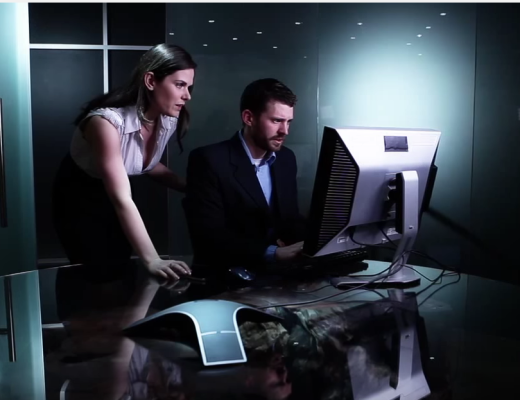
My evil twin, Sophia has been stirring up all kinds of trouble in tap tap tap’s new app, The Heist!

I am truly excited to be a part of this amazing puzzle game app! It has been in the works for a long time for tap tap tap, but within 20 hours the app was #1 in the iTunes store. Pretty incredible!

I had so much fun creating this trailer with an amazing crew lead by Joe Lindsay. Joe shot with a Canon 5DMKII with a 24-70mm f/2.8 and a 100mm f/2.8.

Behind-the-scenes from The Heist trailer-2

Setting up the camera on the dolly –Director of Photography, Joe Lindsay, 1st Assistant Director, Carl Sturgess, Grip, Dana Shaw & Gaffer, Art Phelan.

Behind-the-scenes from The Heist trailer

Our awesome Sound man, Shawn Doyle, who braved the rain & the possibility of getting electrocuted to make this shoot happen :|

Behind-the-scenes from The Heist trailer-3

Interior shot with Lane Genzlinger at Rebel Unit Media’s brand new office.

Joe sets up the shot.

Dana claps, “take three!”

Sam Barber seems to enjoy his role as the evil agent dude a little too much!

Oh! And don’t forget to enter to win a limited edition iPad!

Camera+… Now with Clarity!

Mar 29 2011

Presenting…. Clarity!!! I’m so excited to share this amazing feature with you. I’ve been using Clarity on my images for some time and the results are fantastic!

See before and after picts.

It’s a free upgrade, so definitely pick it up if you already have Camera+, if not, well get it silly! :P

Behind the scenes photos from the video all shot on the Canon 5DMKII to come!!!

Multiple photo sharing with Camera+

Feb 24 2011

Sharing multiple images with Camera+ to Flickr, Twitter, Facebook & by email is a snap. Here’s a video detailing everything you need to know to share your shots to your favourite social sharing sites!

Win My Dream 5DMKII Camera Rig!

Jun 8 2010

I’m just about to fall asleep for the first time in 41 hours. The launch of Camera+, the iPhone photo App I’ve been working on with Taptaptap, coupled with iPhone 4  buzz, the AT&T fail, and general WWDC pandemonium.

I just wanted to let everyone, especially budding photographers, about this ridiculous promotion we are doing for Camera+  to win my dream camera rig (valued at over $10,000).
(more…)

Camera+, The Ultimate iPhone Photo App

Jun 7 2010

Best iPhone Camera App Ever and my first App ; )

Camera+, the App that I’ve been working on for over a year, is now available in the App Store.

Woooo! *does a happy dance*

If you’ve been following my Twitter, Tumblr or Flickr stream, you’ve probably noticed a lot of iPhone shots pop up recently from my trips to New York and San Francisco. Now I can finally share the amazing app that created all those cool FXs!

(more…)

Top 10 Back to School Gadgets for Geeks

Sep 7 2009

Mostly Lisa & the DSiGeekin’ out on the DSi with Blackbox’s M14 ANR headphones.

Back to School doesn’t have to be the end of fun! Well, in all honesty it does, but at least you can soften the blow of returning to the grind by treating yourself to some great geeky gadgets.

neverlate_clock

1. Neverlate 7-day Alarm Clock ($34 + shipping thinkgeek.com)
After a few months of enjoying blissful afternoon sleep-ins, that first week of 7am wake ups are going to smart. To make sure you aren’t late for your first semester of classes like I was in 3rd year University, you might want to invest in a serious alarm clock.

This alarm clock allows you to set 7 independent daily alarms for each day, so you don’t have the nightly annoyance of setting your alarm. You can also customize your snooze time from one to 30 minutes and set a midday nap alarm with the push of a button.

Picture 11

2. Canon SD960 IS Digital Elph Camera ($299)
So you’ve managed to drag yourself out of bed and grab some caffeine and Coco Pops. You should really capture this pivotal moment. Why not snap a picture with the new Canon SD960 IS Digital Elph camera. The slick, pocket-sized point and shoot comes in four colours (blue, pink, silver & gold).

It’s packed with a 12.1 megapixel sensor that takes crisp, vibrant images and stunning HD (1280×720, 30fps) movies. This little camera has the best looking video I’ve seen from a point and shoot in a long time.

space invader bag

3. Space Invaders Messenger Bag ($49 USD + shipping 16BIT.etsy.com)

I guess it’s time to head to school or all that hard work getting out of bed will be for nothing. You definitely need a sweet bag to match your Converse sneakers and ironic tee. 16-Bit has some amazing, handcrafted retro gaming messenger bags that will store your laptop and all your school essentials. From Super Mario to Donkey Kong to Space Invaders, these limited edition bags are as funky as they are functional.

(more…)

Q&A: What camera should I buy for my first dSLR?

Jul 14 2009

Bella & Bokeh
Canon XSi, 50mm f/1.4 lens, 1/80, f/2.0, ISO 100.

First time dSLR buyers always ask me what camera & gear they should get. I’m always hesitant to answer this question, because camera choice is so personal (Canon vs Nikon) and dependent on what you want to shoot and how much money you have.

With that being said, I know how confusing it can be choosing your first dSL with all the options out there, so I’m going to recommend what I consider the best overall and most reasonably priced dSLR for first time buyers, the Canon XSi (450D).

Why the Canon XSi (450D)?

The 12.2MP XSi is not the latest version of Canon’s wildly popular Rebel series, but it is such a solid camera that I feel it’s age is no factor in its performance. I had the opportunity to fully test this camera and I fell in love with it. At that time I had been shooting with an even older model, the Xti (400D), and I was shocked at how much better the XSi performed. If you are looking for all the technical specs, head over to dpreview. They do a pretty sweet job of breaking things down.

One of the great benefits of buying an older body, is that it is considerably cheaper. The new T1 kit is selling for $1099, while the XSi kit is selling for $699 CAN. And trust me, you’ll need that extra $400 to buy all those extra little camera bits like good lenses (which is almost more important than the body), spare batteries, camera bags, filters, etc, that inevitably end up costing $89 each. Also, I think that for a lot of beginners the XSi will be a great first camera.

Canon XSi/450D (back)

You don’t need to spend thousands of dollars buying the latest, greatest camera with all the bells and whistles, when you don’t know how to use those bells and whistles yet. I shot with a Canon Xti for 2 1/2 years before moving up to the 5DMkII. I felt like I knew my Xti backwards and forward and that I had mastered enough skills as a photographer to move up to something more professional.

The XSi does not have video, which may be a draw back for those of you who are really interested in video stuff. But unless you actually plan on creating and editing your own high quality videos, then just use your old point and shoot to capture fun video.

What other camera gear will I need to buy?

(more…)

Learn How to Use Ur Camera

Aug 27 2008

Canon XSi/450D (front)

A lot of people ask me how I take such fantastic pictures. I usually tell them I’m just really talented and obviously have an innate gift for “The Arts”. But because I don’t want to come off as vain, I put this emoticon “:p” at the end. :p

To be honest, I still consider myself quite new to photography and always feel humbled whenever I log into flickr and see the incredible photos people are taking. It seems that order to be a good photographer, you have to constantly learn things, some of them difficult, and be, like, creative all the time. Harsh, I know.

So here I am to help push you to be a better photographer with a super helpful photo tip every week until your photos are awesome, or I get bored of teaching you :p

Here Photo Tip #1: Learn How to Use Your Camera!

1. Read your camera manual!

read your camera manual

I know it’s boring. I didn’t want to read it either, but knowing how to move around your camera insides and outsides is really important. Nothing is more frustrating than fumbling around on your camera in the field. Where is that darn exposure button? How do I delete all pictures? Crud. How do I display the histogram? What are all these numbers and letters on the screen. Ack!

So get a good cuppa tea or coffee (if you prefer that vile stuff) and sit down with your camera and its manual. Go through all the menus and buttons with your camera. Don’t just read it passively, but actively go through every menu setting and button, camera in hand, taking test shots as you go.

I also recommend carrying it in your camera bag if you are a beginner. If you get stuck on something, look it up. Warning: This process may actually lead to learning how to use your camera as more than just an expensive and weighty electronic necklace.

This brings me to my next point…

2. Never use auto settings. Ever.

Auto Robot

I know this is a drastic statement, but trust me on this one, your photos will always look kinda crappy if you use auto settings. That includes the “face” one, the “running man” one, the “mountain” one, the “flower” one, even the “nighttime” or “fireworks” one! Any setting represented by a little cute picture is off limits!

I know that this is a difficult habit to break if you are new to photography. Like most people, I started taking photos on auto settings. After a while, I realized that I had no creative control and I noticed that basic things like focus, exposure, and white balance were all out of wack. Basically, my photos looked subpar and amateur. So I committed a lot of time and effort, and actually learnt stuff about aperture, shutter speed, etc. I know. Crazy.

So repeat after me, “I promise to not use my camera’s default auto setting as a crutch and take control of my photos!”

3. Always set your White Balance


super bad WB! correct WB-1

Nothing looks crappier than photos with incorrect white balance (WB). Your best friend will not appreciate looking like a member of the blue man group on her wedding day. Trust me.

The first thing i do before i take a picture is set the WB. I look around, take a few shots and figure out what the kind of colour temperature I’m dealing with ie. overhead tungsten lights, blinding fluorescents, daylight through a window, etc. and then set the white balance to best match what I see.

If you don’t know what to set the WB to when you are out in the field, then test it using that big screen on the back of your camera that lets you preview photos! Take a few snaps using different WB settings, and decide which best matches the colour of light you see. This may seem tricky, but dicerning between cloudy and sunny isn’t really that tough. And with some practice, you’ll quickly be able to identify trickier things tungsten bulbs and candlelight and mixed light… oh boy.

When you are dealing with a mixed light situation ie., florecent overhead lights, daylight coming in through a big window, use your judgement. What looks the best? Get into the habit of analyzing colour and light and experiment with different WB settings in camera. It’s a really easy thing to do, and will save you a lot of hassle colour correcting in post especially if you haven’t mastered Photoshop, Lightroom, Aperture, or “computers” in general.

To learn more, read this article.

That concludes my lecture for today. Give your camera some extra love this week and take a stack of awesome photos celebrating this last week of summer. If you live in Vancouver or England, remember to bring your umbrella!

Thoughts and comments?

Come say Hi on Flickr & stay tuned for next week’s awesome tip!